Hey there, if you’re reading this, you’re probably either a DTF printer owner staring at that machine when you don’t have a big print job lined up, or maybe someone who just bought one from us and is wondering why your buddy’s printer is running smoother than yours on off days. Let’s cut the jargon—today we’re talking DTF printer idle maintenance, the stuff most new owners skip that ends up costing them way more in repairs or ruined prints later. I’m not here to give you a textbook; this is the real stuff we’ve learned from thousands of printers going idle at our shop, and from fixing the mess when folks skip these steps. DTF Printer

First off, let’s get one thing straight: “idle” doesn’t mean your printer just sits there like a brick. It’s the whole time it’s not pumping out transfers for hoodies, mugs, or whatever you print—like overnight, over the weekend, or even that random Tuesday when your client canceled a last-minute job. I see so many people treat idle time like a break for the printer, but nah, it’s actually a make-or-break period for parts that don’t get used every day. Skip the simple stuff when it’s idle, and before you know it you’re dealing with clogged nozzles, cracked belts, or a powder shaker that’s full of dried-up adhesive garbage. That’s not a “printer issue” — that’s you being lazy on maintenance.
Let’s start with the most critical part: the printhead. This is the heart of your DTF printer, and it’s the first thing to go when it’s idle. I can’t tell you how many times a customer brings in a printer that’s been sitting for 5 days with clogged nozzles, and they go “it worked fine when I shut it down!” Dude, that’s exactly when the ink dries. Here’s what we tell all our customers for short idle times (1-3 days, like a weekend): run a quick head clean before you power off. Not that 10-second fancy clean the printer’s menu gives you—do a deep short clean, the one that uses a little more ink to flush the tiny nozzles so residual ink doesn’t cake up. Then, once that’s done, make sure you cap the printhead properly. Don’t just close the hood and walk away. Wiggle the cap down a little to make sure it’s sealed tight—even a tiny gap is enough for air to get in, dry out the ink, and block nozzles.
For longer idle times, like a week or more? You need to go a step further. We call it the “nozzle soak” hack, and it works way better than random cleans. Before shutting down, do a full head clean, then leave the cap off for 10 minutes while you grab a cup of coffee, then cap it again. Wait, no, hear me out—this lets a tiny bit of fresh ink sit right at the nozzle tip, creating a barrier against air. A lot of new owners are scared to waste ink, but a full nozzle clean uses way more ink than this trick, so it’s worth it. Also, if you’re going more than 2 weeks idle, take the ink tanks off the printer and seal them in airtight bags. I’ve seen ink go bad in a tank in just 10 days of sitting on a printer that’s not running—chemicals separate, and you get streaky prints when you finally fire it up again.
Next, let’s talk about the powder system. This is the other big culprit when a printer’s idle. The powder shaker and conveyor belt are full of fine adhesive powder, right? If you just leave it after a print job, that powder will dry into a solid mess. Even worse, if you turn the heat on for curing while the printer’s idle (which some people do to save time later), that powder will bake onto the belt, making it stretch or crack. Here’s our rule: after every print job, even if it’s just a small one, run the powder shaker for 30 seconds after you take the last transfer off. That shakes all loose powder back into the collection bin, so nothing is sitting on the conveyor. Then, wipe the top of the conveyor with a lint-free cloth and a little isopropyl alcohol (90% or higher, not that 70% stuff). Wipe it in the direction of the belt, not back and forth, because that can push powder into the edges where you can’t get it out. If you’re idle for more than 3 days, take the powder bin out, empty any remaining powder into an airtight container (it’s reusable, don’t waste it!), and wipe the bin too. No powder sitting there getting hard = no clogged powder feed when you’re ready to print again.
Then there are the little parts people never think about: the belts, the rollers, and the inside of the printer. These get dust and powder buildup over time, especially when the printer’s not moving. Let’s start with the belt—this is what moves your prints from the printhead to the curing oven. If it’s covered in dust and powder, when you start printing again, it will leave tiny marks on your transfers. For idle times, if you’re going a few days, just run a blank print job (no ink) for 1 full pass of the belt to shake off any loose debris. For longer idle times, take the belt out if it’s easy, or use a soft brush to gently brush off dust, then wipe it with that same isopropyl alcohol and lint-free cloth. Don’t pour alcohol directly on the belt—just dab the cloth.
Rollers are the same way. These little rubber rollers that pull the belt along get hard when they’re not in use, especially if there’s powder on them. Once they’re hard, they don’t grip the belt right, so you get uneven movement and ruined prints. Once a week, even if the printer’s idle, take a clean cloth with a little alcohol and wipe each roller. Rotate them by hand so you get all sides, not just the part that touches the belt. That keeps them soft and working right.
Now, the big one: power management. A lot of owners just pull the plug when the printer’s idle, thinking that saves energy, but that’s actually bad. Printers have small circuit boards that need a little bit of power to keep parts from corroding. If you leave it plugged in but in sleep mode, that’s fine—just make sure you set the sleep mode to turn on after 1 hour, not 24 hours. Running it on sleep mode keeps a tiny bit of power going, so the capping station (that thing that seals the printhead) doesn’t get stuck in one position for days. Stuck capping stations get gummed up, and then when you need it, it won’t seal the printhead properly. Pro tip: if you’re going away for more than a month, then you can unplug it. But before you do that, do a full head clean, cap it tight, cover the whole printer with a dust cover (we sell these for our printers, but any heavy fabric will work), and make sure the room is not too humid. Humidity is the enemy of ink when it’s sitting still—too much moisture in the air, and ink mold grows, which clogs nozzles faster than dry ink.
Wait, speaking of humidity—let’s talk about storage for supplies too. If you’re going idle for a while, don’t leave your ink bottles or powder out in the open. Put them in a cool, dry closet, away from windows or radiators. Ink and powder don’t like extreme temperatures either—if it’s 90 degrees in your garage where your printer is, ink will thicken, and powder will clump. I’ve had customers come to us with clumped powder that they left in the printer’s powder bin over a summer, and they had to replace the whole powder feed system. That’s a $500 part, all because they left powder sitting in the heat.
Now, let’s bust some common myths, because I hear these all the time. First myth: “My printer has an auto-clean feature, so I don’t need to do anything.” Bro, auto-clean only runs when the printer detects something is wrong. It won’t run at 2am when you shut it down for the night, so by the time it triggers, your nozzles are already clogged. Second myth: “I’ll just run a test print when I’m back, that’s enough.” A test print only checks a few nozzles—most of the ones on the edges will be clogged if you skipped maintenance, and you’ll waste ink trying to clear them. Third myth: “Wiping the printhead will scratch it.” If you use the right cloth (lint-free microfiber, not a paper towel or old t-shirt) and gentle pressure, you’re fine. Paper towels have tiny fibers that get stuck, and old t-shirts have loose threads—avoid those at all costs.
Let’s also talk about seasonal idle times, because that’s a big one. A lot of small business owners who print DTF do it part-time, so they might shut down their printer for 2 weeks over Christmas, or 1 month in the summer when things are slow. What’s different there? More time means more opportunity for issues. So before a long shutdown, make sure you do a full system flush if you can. Wait, no—if you’re not comfortable flushing the printhead, just run 2 full deep cleans before you shut down, and cap it twice to make sure it’s sealed. Also, remove the powder bin, empty all powder (store it in an airtight jar, label it with the date, it’s good for up to 6 months if stored right), and wipe the conveyor and all rollers down twice, not once. And if you can, turn the temperature in the room to 60-70 degrees Fahrenheit—no extreme cold or heat.
Here’s a real example that stuck with me. A customer bought a printer from us 8 months ago, he’s a local custom tee shop. He went on a 10-day vacation in March, didn’t do any maintenance, just shut it down and left. When he came back, half his nozzles were clogged, the powder shaker had rusted, and the conveyor belt had a 2-inch crack from sitting in a cold garage (turns out his garage gets down to 40 degrees at night in March). He ended up paying $1,200 in repairs, plus lost 2 weeks of business while he waited for parts. If he had spent 20 minutes doing the idle maintenance we talk about here, he would have avoided all that. That’s the stuff I don’t see in any fancy manual—real-world mistakes.
Now, let’s make this super simple, so you don’t have to overcomplicate it. We have a little checklist we give all our customers, and it takes less than 15 minutes to do, no matter how long you’re idling. For idling less than 3 days: 1. Run deep printhead clean, cap tight. 2. Shake powder shaker for 30 sec, wipe conveyor top. 3. Set printer to sleep mode after 1 hour. For idling 3 days to 2 weeks: 1. Two deep printhead cleans, cap twice. 2. Empty powder bin, wipe bin, store powder airtight. 3. Wipe belt and rollers with isopropyl alcohol. 4. Keep printer plugged in, sleep mode on. For idling over 2 weeks: 1. Full deep clean, cap triple-check. 2. Remove all ink tanks, seal airtight. 3. Deep clean belt, rollers, powder system. 4. Unplug printer, cover with dust cover, store supplies in cool dry space. That’s it. No fancy tools, no fancy chemicals, just 15 minutes of work.
At the end of the day, your DTF printer is an investment. You didn’t drop thousands on it to have it break down because you skipped simple care when you’re not using it. We see it every day—owners who skip idle maintenance spend more on repairs than they would have spent on maintenance every month. The good news is this is all easy stuff, once you make it a habit. It’s not a chore, it’s just part of owning a printer, like changing the oil in your car.
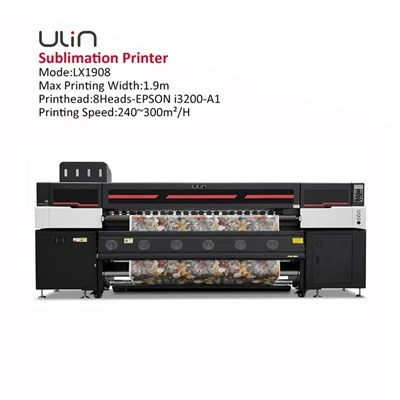
If you’re thinking about picking up a DTF printer, or you have one that’s giving you trouble because of bad idle care, hit us up. We’re not just a supplier—we’re the guys who answer the phone at 8pm when your printer is clogged at 2am and you have a big order due. We’ll walk you through every step, no sales pitch, no nonsense. Whether you need a new machine, parts, or just tips to keep your current one running smooth, we’re here. Don’t let a little idle time turn into a huge headache—take care of your printer when it’s not running, and it’ll take care of you when you need to pump out orders.
References
UV Roll To Roll Printer DTF Printer Maintenance Best Practices, Textile Print Solutions Journal, 2023
Idling Effects on Printhead Durability, Inkjet Technology Report, Vol. 18, No. 2, 2022
Powder Handling Protocols for DTF Systems, Custom Garment Printer Association Guide, 2024
Environmental Impacts on DTF Print Materials During Storage, Industrial Print Equipment Review, 2023
Hangzhou Yulan Technology Co., Ltd.
Hangzhou Yulan Technology Co., Ltd. is one of the most professional DTF printer manufacturers and suppliers in China. With abundant experience, we warmly welcome you to wholesale the newest DTF printer in stock here from our factory. Good service and quality products are available.
Address: 3rd Floor, Building 4, Kechuang Park, No. 43 Wuzhou Road, Donghu Sub-district, Linping District, Hangzhou,CHINA
E-mail: ulinprint@gmail.com
WebSite: https://www.ulinprinter.com/
