Hey everyone! Let’s cut to the chase—if you’ve ever shopped for a USB inspection camera (you know, the ones that help you peek inside wall voids, inspect car AC lines, check under sink pipes, or even spot tiny defects on circuit boards), you’ve probably stared at specs and thought, “Wait, what does this ‘resolution’ number actually mean? Is 720p enough, or do I need to splurge on 4K? And why do some listings lie about it anyway?” As someone who’s been in this game for years—running a USB inspection camera supplier that works with plumbers, electricians, auto techs, and DIYers alike—I hear these questions every single day. Today, I’m breaking this down like we’re chatting over a coffee, no stuffy jargon, just real talk about what resolution actually matters for your uses, not just what marketers put on boxes. USB Inspection Camera

First, let’s get one boring but crucial fact out of the way: resolution isn’t just a random tech stat. It’s the number of tiny pixels crammed into the camera’s sensor, right? More pixels = more detail, simple as that. But here’s the thing no sales rep will tell you: not all resolutions are created equal for USB inspection cameras, because most of these aren’t the giant 4K DSLR sensors you use for photos. These are tiny mini sensors, built into a camera tip that’s often smaller than a pen, so manufacturers have to balance pixel count with sensor size—too many pixels on a too-small sensor, and you get garbage, grainy images that are worse than a low-res cam.
Let’s start with the typical resolutions you’ll actually find on USB inspection cameras, not the “up to 8K” fake numbers some sellers throw around. Let’s go from the budget end to the pro end, because that’s where most people land.
First, budget models—usually under $50, the ones you see on Amazon or at home improvement stores for quick DIY fixes. Their resolution is almost always 480p, sometimes called VGA (that’s the old computer monitor standard from the 90s, for context). Wait, 480p? That sounds low, but let’s be real—when do you need this? If you’re just poking a camera under your sink to see if a pipe has a tiny leak spot, or checking if a dryer vent is clogged with lint big bits, 480p is enough. You’ll see the general shape of a crack or a huge clump of lint. But here’s the catch: these budget cams have such tiny sensors that the pixels are spaced too far apart, so anything smaller than a pinhead? You’re not gonna see it. I’ve had customers come back saying their $30 480p cam missed a 1mm crack in a radiator pipe that ended up causing water damage—oops. That’s why budget is great for quick, rough checks, but if you need real detail, skip the 480p.
Next up, the sweet spot for most people—this is the resolution we build most of our mid-tier models around, and what 90% of our regular customers (plumbers, residential electricians, DIYers) swear by: 720p HD. Wait, 720p isn’t perfect, but let’s talk about why it works for USB inspection cams specifically. 720p is 1280 x 720 pixels, right? And because we pair this with a sensor that’s just big enough (we don’t cram 720p into a tip smaller than 8mm, that’s where grain happens), you get sharp, clear images where you can spot things as small as a 0.5mm scratch or a tiny mineral deposit on a pipe. I had a plumber last month tell me he uses our 720p model for 90% of his calls—he can see exactly where a leak is on a copper pipe without tearing apart drywall, and he can tell if a wire’s insulation is frayed just by looking at it. The best part? 720p models aren’t crazy expensive—they’re usually $50 to $100, which is way more accessible than pro stuff, and they work great for most jobs. No need to drop $200+ unless you actually need the extra detail.
Wait, but what about 1080p? You see that on a lot of models too, right? Is that worth it? Let’s be honest—for most people, no, not really. 1080p is 1920 x 1080 pixels, which is double the total pixels of 720p, so it sounds way better. But here’s the tradeoff for USB inspection cameras: higher resolution means bigger file sizes for videos and photos, and it requires more power (so your battery dies faster on cordless models) and more processing power on your phone or tablet when you view the feed. Also, since most people are using these cameras on a 5-inch phone screen or a small monitor, you’ll barely notice the difference between 720p and 1080p at that size. Unless you’re working on tiny, super precise jobs—like checking tiny electronic components (circuit board solder points) or inspecting small automotive parts like fuel injectors—1080p is overkill. I only recommend 1080p to our pro customers who do specialized work, not the general crowd.
And then there’s 4K, the shiny number everyone chases. Let’s get this out of the way: 99% of USB inspection cameras claiming to be 4K are lying. Why? Because a true 4K sensor for a tiny camera tip (usually 5mm to 10mm diameter) would be super expensive, and the image would be grainy as hell because you’re cramming 8 million pixels into a sensor smaller than a pencil eraser. Most “4K” inspection cams are actually upscaling 1080p footage, which means the camera is taking the low-res signal and stretching it to look 4K, but it’s still just 1080p under the hood—no real extra detail. The only actual 4K USB inspection cams you’ll find are the super pro models, $500+, and most of our industrial clients don’t even use them because 1080p is enough for their needs. I’d save your money—skip the fake 4K marketing, it’s not worth it.
Wait, but I need to talk about two other things that mess with resolution way more than the number on the box: lens quality and lighting. This is the biggest mistake people make when buying a cheap inspection cam—they focus only on resolution and ignore the lens and LEDs. A $30 cam with a terrible lens that’s blurry no matter how many pixels it has is useless, and a 720p cam with a high-quality glass lens and bright, adjustable LEDs (not the crappy cheap LEDs that wash everything out) will give you way better images than a 1080p cam with a plastic lens and dim, flickering lights. That’s something us suppliers actually test—we don’t just slap a sensor in a plastic tip and call it good, we make sure the lens is calibrated for that sensor, so you get sharp, clear images, not just a big number on the spec sheet.
Let me throw in a real example from last week to make this concrete. A customer bought a budget 480p cam from a big box store to check his AC drain line for clogs. He emailed us saying it was useless—he could barely see anything, just a blurry dark mess. He came to us and picked up our mid-tier 720p model, and he replied an hour later saying he found the clog (a tiny ball of moss) in 2 minutes, no calling an HVAC tech. That’s resolution that works, not just a number. Another customer, a hobbyist machinist, bought our 1080p model to inspect tiny engine parts, and he said he could see a tiny crack in a cylinder wall that he would’ve missed with 720p. So it’s not that higher resolution is bad—it’s that it’s only good if you actually need that level of detail, and a lot of marketers make it sound like you need the highest res possible, which isn’t true.
Also, let’s talk about USB connection type, because that affects how resolution is delivered. A lot of people don’t realize that USB inspection cameras plug into your phone (micro-USB, USB-C) or a computer, and the type of USB affects how much data the camera can send. For example, old USB 2.0 ports can only handle up to 720p smoothly, so if you have a 1080p cam plugging into a USB 2.0 port, it’ll downscale the feed automatically, so you’re not getting the full 1080p anyway. That’s another gotcha—even if your cam says 1080p, if your USB is old, you won’t get it. Our mid-tier 720p models are optimized for USB 2.0 and USB 3.0, so they work on every device, no matter what port you have, which is why they’re so popular.
Now, let’s wrap this up with a quick cheat sheet, so you don’t have to overthink it:
- If you’re a DIYer doing quick checks (under sink, dryer vents, basic pipe checks): Stick to 720p. It’s cheap enough, works great, no wasted money.
- If you’re a pro doing specialized work (circuit boards, tiny automotive parts, precision inspections): 1080p is worth the extra cash.
- Budget DIY, just seeing big clogs or general shape: 480p is fine, but don’t be surprised if it misses small details.
- Skip the fake 4K “super resolution” cams—they’re a waste of money.
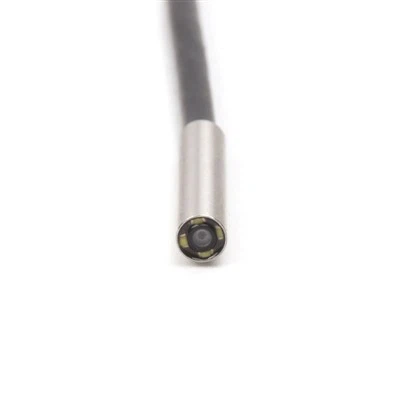
One last thing: every USB inspection cam we sell comes with a 30-day return policy, because we want you to test it and see for yourself. If you try our 720p model and it’s not what you need, send it back. If you’re ready to grab one for your next project, don’t hesitate to reach out to our team to chat about your specific needs—we don’t do pushy sales stuff, we just help you pick the right cam for what you’re actually going to use it for. No weird hoops, no hidden fees, just honest advice from people who’ve been in this industry for years.
Industrial Endoscope References:
- Digital Image Sensors: Pixels, Resolution, and Sensor Size (Consumer Reports, 2022)
- USB Inspection Camera Spec Comparison Guide (Industrial Imaging Association, 2023)
- Consumer Use Case Analysis for Handheld Inspection Cameras (DIY Home Improvement Review, 2024)
- USB Standard Data Transfer Rates and Device Resolution Limits (USB Implementers Forum, 2022)
Shenzhen EZON Electronics Co., Ltd.
Shenzhen EZON Electronics Co., Ltd. is well-known as one of the leading usb inspection camera manufacturers and suppliers in China. Please feel free to buy customized usb inspection camera at competitive price from our factory. Good service and quality products are available.
Address: 3A-7, Building B, Qianwan Hard Technology Industrial Park, Xixiang Street, Bao’an District, Shenzhen
E-mail: sales@ezon-endosope.com
WebSite: https://www.ezon-endosope.com/
